
Digital signage & alerts
Every screen in the building — and the alert that takes them all over
Playlists on the televisions you already own, plus an emergency alert that takes over every screen over whatever was playing — self-hosted, with no per-screen fees.
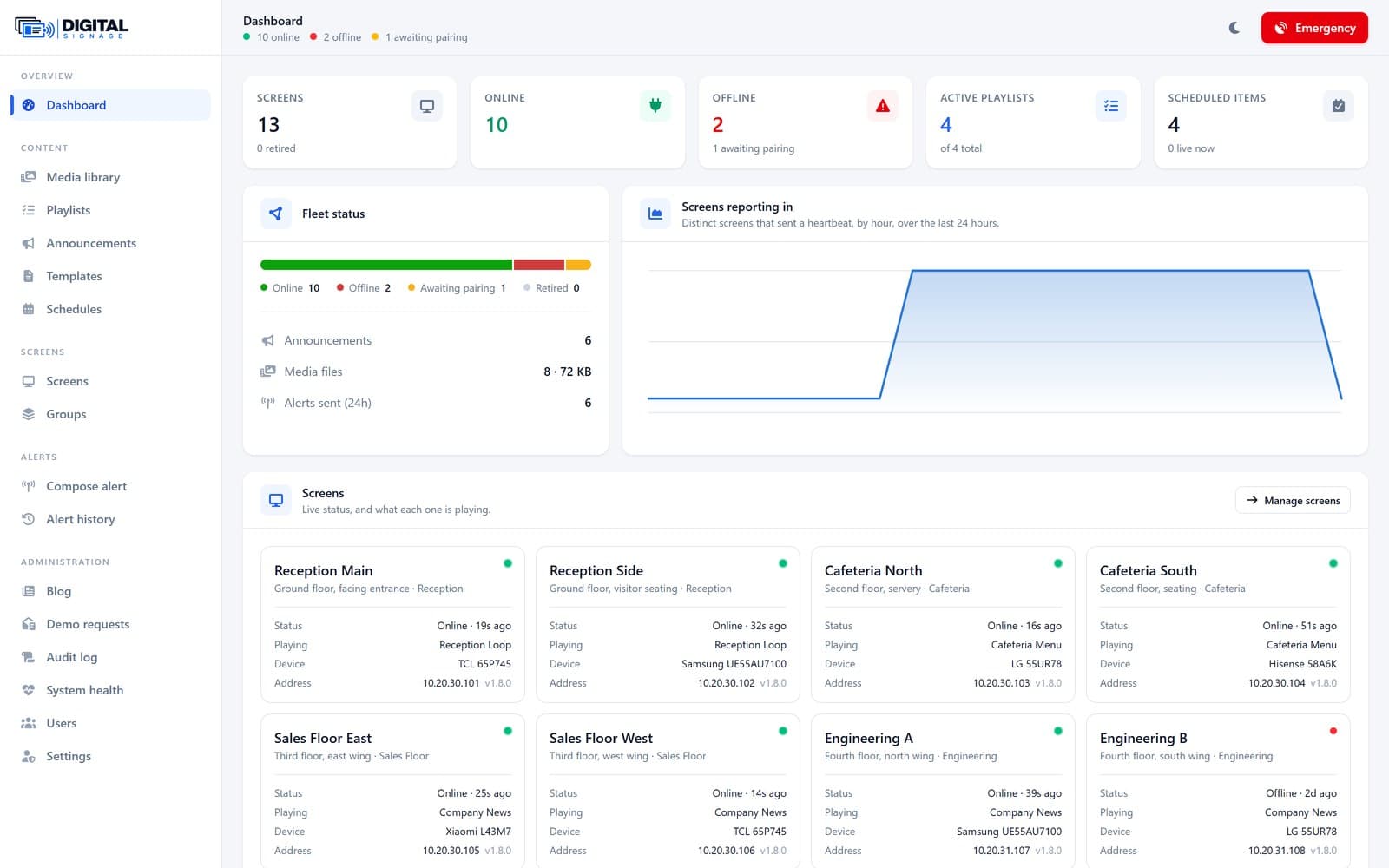
Digital Signage puts one panel in front of every screen in a building: playlists of images, video and designed announcement cards loop on televisions the customer already owns. The part that sells it is the second channel — an emergency alert takes over every screen in seconds, over whatever was playing, including another application such as a news channel someone left running. It installs on the customer’s own server, there is no per-screen licence, and no content leaves the building unless the customer chooses to put the server outside it.
Why most signage fails when it matters
A television in a corridor is playing a news channel, not your signage — and on Android an app cannot simply push itself in front of another app, so most signage software waits its turn and the emergency message never appears. Nobody knows whether a message actually arrived: the panel says "sent" while a screen on the fourth floor has shown a frozen frame since Tuesday. The price scales at exactly the wrong moment, because per-screen subscriptions are painful at fifty screens — which is where signage becomes genuinely useful. The network drops and screens go blank, or show a browser error to a waiting room. And the people who most need reaching — warehouse, ward and shop-floor staff — do not have an inbox open. Digital Signage is built around those failures.
What it does
A signage player and an alert channel that behave the way a building actually needs.
Emergency alerts that actually interrupt
Takes the whole screen over whatever is playing, including other apps. On Android this uses the "Display over other apps" permission granted once at setup, with a foreground service and a full-screen-intent fallback.
Runs on televisions you already own
An ordinary Android app from an APK — no custom ROM, no root. Samsung and LG sets run the web player in the TV’s own browser with nothing to install, and phones and tablets take the same alerts.
Offline playback
Media is cached on the device and addressed by checksum, so a screen keeps playing through a network outage and only re-downloads a file when it actually changes.
Proof of delivery, per screen
Every screen acknowledges what it received, sends a heartbeat and can be asked for a screenshot — so the panel shows what is on the wall, not just what was sent.
Scheduling & dayparting
The right content at the right hour without anyone touching it, with priorities so an emergency outranks a schedule and a schedule outranks the default loop.
Playlists, media & announcement cards
Images and video in timed loops, plus announcement cards built in the panel from templates — no external design tool needed for "Fire drill at 15:00".
Self-hosted, licensed per site
Installs on the customer’s own hosting — shared hosting, a VPS or a machine in their rack. The fiftieth screen costs what the fifth did.
Five roles, permission-gated
Super Admin, Administrator, Content Manager, Publisher and Viewer — enforced server-side by named abilities, not by hiding buttons, with every change written to an audit log.
Screens
A closer look inside Digital Signage
Real screenshots of the running system, with demonstration content. Tap any shot to enlarge it.
Industries we serve
One system, many kinds of building
Digital Signage is sold by the kind of building it goes into rather than a shop type — anywhere that runs screens on the walls and needs to interrupt them. The buyer is usually a facilities manager, an internal-comms lead, or the IT manager asked to run it.
Offices
Reception, meeting-room and internal-comms screens, with alerts across the floor.
Factories & warehouses
Safety notices and shift information for staff who never open an inbox.
Healthcare
Waiting-room and ward screens, kept in the building on the estate’s own server.
Education
Campus notices and lecture information, with a lockdown alert to every screen.
Retail & hospitality
Menus, promotions and queue information on the screens you already own.
Public sector
Public-facing information with data kept on-premises for procurement rules.
Anywhere with screens on the walls and a reason to interrupt them — offices, factories, hospitals, campuses, shops or public buildings — the same self-hosted system fits, with content and alerts scoped to each area. Tell us what your building shows and we will show you how it maps.
Talk to usWhat it is measured at
- An alert is on screen in 2–5 seconds — measured on ordinary shared hosting where devices poll, and faster with a socket.
- Playback continues at 100% during a network outage, catching up on its own when the network returns.
- 25+ screens run on one modest shared-hosting server, and more with a database upgrade.
- A dark screen is reported offline within 90 seconds of missing its heartbeat.
- There are no per-screen licence fees, at any fleet size.
Common questions
Yes, on Android. The app uses Android’s "Display over other apps" permission — the documented exemption that lets an app come to the foreground — granted once at setup, by hand or with one command during a fleet rollout. Samsung and LG sets running the web player cannot cover the set’s other inputs, because a browser cannot.
No. It runs on the Android TVs and boxes you already own, on Samsung and LG sets via the built-in browser, and on phones and tablets. Dedicated players work too, but nothing requires them.
Screens keep playing. Media is cached locally and addressed by checksum, and the player catches up on its own when the connection returns. The one thing it cannot do offline is receive a new emergency alert.
On your own server. It is installed on your hosting, and nothing leaves the building unless you choose to put the server outside it — which is the main reason NHS estates and public-sector buyers look at it.
25 or more on one modest shared-hosting server, and more with a database upgrade. There is no licence limit at any number — the fiftieth screen costs what the fifth did.
The player shows a six-character code; you type it into the panel once. On Android, "Display over other apps" is granted at the same time, and for a large rollout a provisioning script does both over adb.
See it take over a screen
Book a walkthrough and we will show the alert channel, the offline playback and the per-screen proof of delivery on real screens — arranged on request rather than a public login.